
What exactly is wifi coverage? We’ll look at what coverage “looks like”, the importance of frequency bands, and what’s simply killing your coverage.
What Wireless Coverage Is
Coverage is a measure of how large an area around a wireless transmitter has sufficient signal strength for wireless devices.
You can read more here about what constitutes “good” signal strength and how to measure it: Good wireless signal strength–what is required?
Coverage Goes Both Ways
However, wifi communication is a two-way street! Therefore, you also need the signals from your PC and mobile to be able to reach back to the access point, to have real coverage.
This is important to keep in mind because wireless devices, especially smartphones and other smaller devices, usually send weaker signals than the wireless access points that they communicate with.
Frequency Bands And Ranges
Wifi uses three different frequency bands – 2.4 GHz, 5 GHz, and 6 GHz.
2.4 GHz: Long Range, Poor Capacity
Older equipment typically only supports the 2.4 GHz band. These signals can reach relatively far, which also means that they tend to create interference for other networks. They are also more susceptible to interference from others, such as neighboring networks and Bluetooth equipment.
If you have a router and/or devices that only support 2.4 GHz, you can expect uneven speed and unreliable coverage, unless your home is completely isolated from other wireless networks.
5 GHz and 6 GHz: Shorter Range, Good Capacity
These signals are far less susceptible to interference, and also create less interference for other networks. However, you will also likely need more wireless access points in order to cover an entire home, because the signals have a shorter range.
Make Sure The Best Band Is Being Used
New wireless equipment usually supports both 5 and 2.4 GHz, and the typical wireless router has at least two wireless networks. 6 GHz is not very commonly available yet.
The smartest equipment also has band steering, which means you do not need to know which network to connect to, but many routers simply have two networks with different names and passwords, so you will have to make sure that all devices connect where they get the best possible performance given what they support.
You can read more about band steering here: Why band steering means better wifi.
The Shape of Coverage
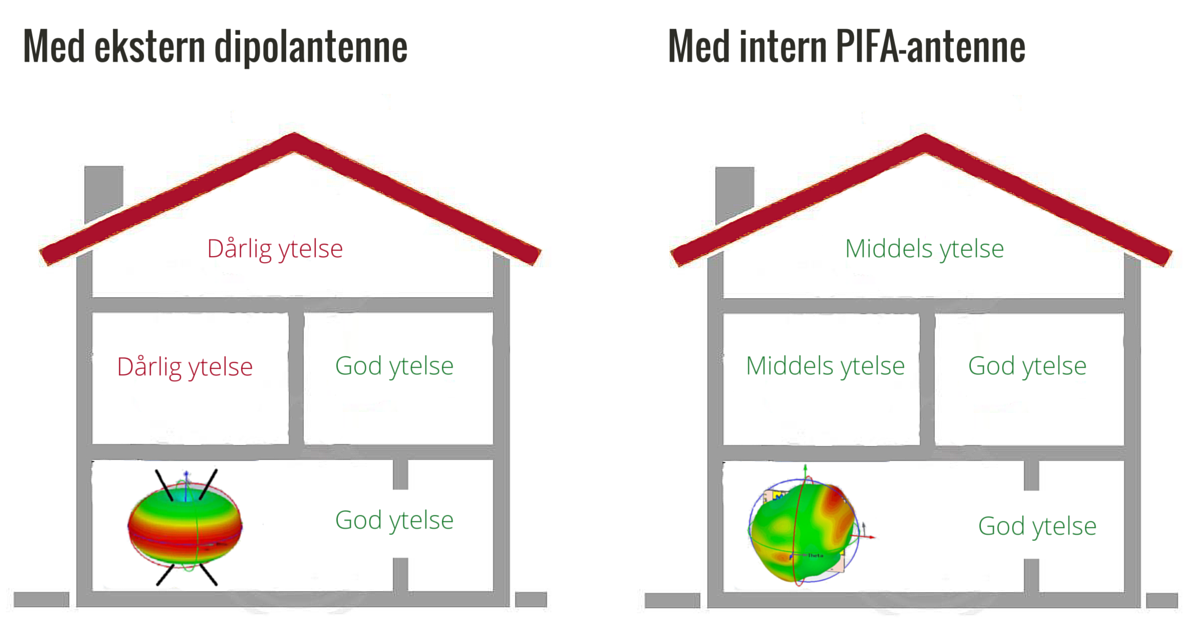
How the coverage field extends around a wireless access point depends on how it’s designed — primarily on the type and number of antennas used.
A classic wireless router with two or more external antennas pointing in different directions has a doughnut-shaped coverage area surrounding it. Areas directly above and below the router one can therefore end up inside the doughnut hole and have bad or no coverage, even though the router is sending strong signals with high speed.
If you have a wireless access point with built-in antennas along all the sides, you get a spherical coverage area, which basically stretches equally far in all directions.
You can read more about the difference between internal and external antennas here: Derfor er interne antenner best til trådløst hjemme
Murder for Your Coverage
Coverage is absolutely not just a matter of what is technically supported by the equipment you have. Radio signals are physics, and even the best and most expensive equipment cannot abolish the laws of physics. Both the “doughnut” and the “sphere” described above will, in most cases, encounter obstacles.
Physical obstacles such as reinforced concrete in walls, floors, and ceilings, or heated floors, can be murder for wifi signals. Do you have a large and cozy brick fireplace in the center of your home? Wifi signals are unlikely to get through.
The second major coverage issue is interference from other wireless signals. It can be the neighbor’s wifi network, a baby monitor, Bluetooth speakers, or even a microwave oven.
Read more about obstacles to wifi here: 10 things that block or interfere with wifi signals
How to Measure Coverage
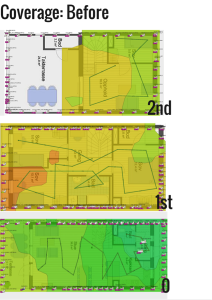
If you want to know what the coverage is like throughout your home, running a speed test or two is not enough. The best thing is to use a heatmapper application on your PC or mobile to perform multiple measurements and assemble them into a heat map that shows how the signals extend in your home.
Remember that the results will be based on the signal that your PC or mobile receives and the frequency band to which it is connected. Optionally, measure twice; once for each frequency band.
You can read more about heat maps here: Map Your Wireless Network with a Heat Mapper
Improve Your Coverage for Free
Once you know where your coverage is good and bad, you will also be able to see if whether is something simple you can do to improve it. First of all, no matter what equipment you have, place all routers, repeaters or other wireless access points as high up and as free of physical obstacles as possible. Eliminate as many obstacles as you can.
Find more tips on what you can do yourself here: Better wifi at home: 18 free tips
Be skeptical of wifi repeaters
Many people look for a wireless repeater when they have problems with the wireless coverage at home. This may work out OK in some cases, but it also risks making matters worse if the setup is less than perfect – and if you have more than one dead zone, you will soon have to juggle more repeaters.
You can read more about why we do not recommend wifi repeaters here: Five reasons not to buy a wifi repeater
The Safe Road to Complete Coverage
If you want full coverage throughout your home, a mesh network with multiple wireless access points is the simplest and safest solution. With multiple access points, you can work around physical obstacles and spread the coverage, and the access points can distribute the traffic between them as load balancing.
At Eye Networks, we sell mesh networks from manufacturers such as eero and Zyxel and naturally recommend them. Contact your internet service provider to find out what mesh solutions they offer!
Article by Jorunn Danielsen